
Home of Metal Walking Tour
A decade ago Capsule embarked on a mission to officially recognise the West Midlands as the birthplace of heavy metal music. Home of Metal became a series of exhibitions, events and a permanent digital archive, securing the region as the music genre’s rightful home.
Ten years later, Judas Priest and Black Sabbath can be heard on the soundtrack of Birmingham’s latest export, Peaky Blinders.

In March 2009, Capsule arranged a walking tour of Birmingham by the late historian, music producer and heavy metal expert, Chris Phipps. The walk was recorded; the audio became part of my Silver Skins podcast and my work on geolocation stories for my MA in Online Journalism.

Home of Metal is back at Birmingham Town Hall with a tribute to the mighty Sabbath. To celebrate Home of Metal’s huge achievement and in timely tribute to Chris Phipps who passed away this year I’m reproducing the walk here.
When I first discussed the project with Chris he was a little hesitant of me using the material for my MA project – but he changed his mind once he’d seen and heard it. “PLEASE RETAIN THIS AFTER YOUR MARK AND KEEP IT ONLINE”.
So here is the tour which is designed to be listened to in real time as you walk around Birmingham, UK.

The map and the tour
Place yourself in Victoria Square, Birmingham next to Anthony Gormley’s Iron:Man. Press play on the podcast below and follow the Google map from top to bottom. Apart from the Town Hall, all of the musical landmarks have been demolished or renamed but the audio will help identify their locations for you.
Swipe left below to reveal the starting point.

A decade ago I was pretty impressed with iTunes’ chapter function. I created an MP4 and used thumbnails to effectively create an audio slideshow to illustrate the walk. This no functionality no longer seems to work on Apple Music but any of you can get it working feel free to download the enhanced podcast from my old Wordpress or directly from my Dropbox.
And if you do please let me know what media / podcast player you used!

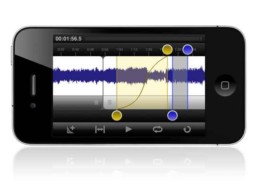
Journalism Tech Review: FiRE
NOTE: Fire 2 is no longer being updated. Smartphones now have much more sophisticated recording apps inbuilt.
Many apps have been developed to enhance smartphones’ often impressive audio recording ability but FiRe was the first to really attempt to be a professional field recorder. Initially launched on the iPhone (at a pretty high price of £3.99) it did prove to be very reliable so much so that many commercial radio stations (including GMG) encouraged reporters to use it instead of a bulky Marantz. Last year Audiofile stopped supporting FiRe and instead offered FiRe 2 an upgrade of the recorder which required you (somewhat cheekily) to buy it for another £3.99.
How it helps you
Although there are plenty of apps on the market that are easier to use this one is not only professional but also extremely flexible. You can add your own metadata which prevents the audio getting lost and can help when adding further context to an online story. With FiRe 2 there is integration with Dropbox - blowing Dropvox out of the water by a considerable distance. A sub or producer could easier pick up a story and it is easier to configure than FTP. There are also some pretty nifty editing tools so you’re out in the field getting an interview anyway you can easily file the audio before the story. And there's Soundcloud integration which in private could be a handy archive but in public could also mean that a story could be broken on the platform.
In Practice
To test this app thoroughly, I recorded an interview using a the new app, we recorded it onto the camera microphone in an echoey dressing room whilst the interviewee ate a satsuma. The sound wave monitoring is very accurate which means you can avoid distortion. The noise quality has always been good but there’s a few more EQ settings (powered by Izotope) and extended metadata you can add before downloading. I did try editing the audio using the app but it was very fiddly, and then it crashed. I trimmed the audio (particularly the satusuma sucks) using Audacity on my computer and then uploaded to Audioboo, you get space for unlimited Boo’s on Audioboo whereas I’ve already filled my free Soundcloud account.
Drawbacks
You don’t need to have FiRe 1 installed to use FiRe 2 but, somewhat irritatingly it doesn’t incorporate the recordings you have already on the phone. There are a lot file format options on the new app but it does seem buggier than the first version.
Summary
An excellent field recorder - an average exporter - a pretty rough editor.
Rating



Journalism Tech Review: Cowbird
History
Cowbird launched on December 8, 2011 and immediately became a place for people from the Occupy Wall Street movement to share their stories. Last year National Geographic used the website to help residents from Pine Ridge Indian Reservation to tell their stories. It's easy to see why it would appeal to National Geographic as it allows you to tell stories with strong images. A few weeks ago it was announced there is now an embed option, allowing you to place your stories on most websites.
In practice
I uploaded a photo and told a small story. Cowbird has a freemium model so one image is the maximum you can upload without paying $60 to become a "citizen". Other advantages of being a citizen is the ability to link stories and further customise your stories such as adding your own handwriting, adding hyperlinks, changing the colour palate and further interacting with the community. But there's nothing to stop you putting different stories in parallel in one post, but if you wanted to use the platform to collect other people's stories around a subject then you'd have to pay. Although the embed (below) is nice, on Cowbird the story fills the screen and has a stronger impact.
The share (or "retelling") facilities are pretty easy for Facebook, Pinterest and Tumblr. Although, as with many inbuilt auto post functions they don't embed natively to their platform or tag properly. I found it nicer to just use the embed function on my Tumblr page for example.
How it helps you
The stories that you can create are best accompanied by strong photo stories. You can also embed audio so there's nothing to stop you from telling media-rich stories. If you do decide to opt for citizenship then this could all be built into the platform and the multipage option would allow you to tell longer stories, even comic strips or data stories.
Drawbacks
All the best functions come at a price. The embed function is good but the mobile interface is less appealing. Although this is probably not the central aim of this site, it would be difficult to collate a breaking news story, as this requires citizenship.
Summary
An intriguing way to tell multimedia stories without learning any HTML.
Rating
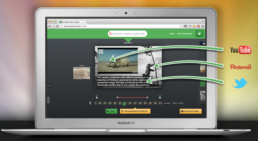
Journalism Tech Review: Soo Meta
NOTE: Sooo Meta is sooo over.
History
Soo Meta is a browser based editing tool which according to the website blurb allows you to create multimedia stories in minutes.
How it helps you
As well as marketers and educators, this tool was created with journalists in mind "Viewers expect more and more visual content. It’s time to deliver short movies, rich-media stories in your posts! Your audience will love it!" Like with Popcorn Maker the idea is that you enrich your original media by adding more multimedia frills. The video demonstrates how to use the Google bookmarklet to collect words, video and images from around the web, this has the added advantage of allowing you to cite your sources.
In practice
It took longer than "a few minutes" to get to grips with this tool. This is because the demonstration video only shows how to grab material via the bookmarklet, yet it doesn't show you how to install the bookmarklet. Once I'd worked that out I was well into my story. When I attempt to install in Chrome it crashed, I finally installed it in Firefox but was unable to view the video in this browser. I had to complete the edit in Chrome then add the images again (so it carried across the metadata) in Firefox. More than once whilst hopping about I crashed my browser and had to step back.
Drawbacks
Aside from the browser malfunctions, there's very little support for this tool and you are pretty much on your own when it comes to working out what's wrong. Even more unhelpfully if you do try and Google "Soo cut" (the name of the bookmarklet) you get a load of "soo cute" images and chintzy Google apps.
Summary
A great idea which appears simple but can be frustratingly tricky in practice.
Rating
More Audio Visual Mapping Possiblities
Following my audio map blog Woices contacted me and offered me the infospot for free for a year. You can download the iPhone app from here. I'd love to know how you get on with it. Hopefully they have plans to develop an Android version soon.

I was also talked through the early stages of Ruby and given a book on Rails by @budhhamagnet whilst at Ruby In The Pub. Although I know I've got a steep hill to climb I think I might be able to develop something even better.
In preparation for International Dance Festival frolics Chris Unitt has alerted me to the possibilities of playing around with augmented reality app Layar. Keep an eye and ear out for more developments...
In the mean time you may not have spotted the enhanced podcast, with pictures in iPod or iTunes or just a nice sound tour for everyone else. Download the enhanced podcast here. Or the normal MP3 here.